SSACommonDllInit failed for enu(SBL-GEN-02505) is an error which I got while opening Siebel tools. Let's look into the issue, it is an Initialization error for the ENU (English) Client. So it can be either a configuration issue or a file missing issue.
You can try searching installation directory for the .cfg file. but there wont be a result...!!! How this could happen? The answer is simple. Installation got corrupt. Even if we copy files from a working environment the client wont function properly. And a common issue is internet explorer gets close automatically.
The best practice is to Re-Install Siebel thick client.
In case of configuration error try editing the "Target" in your shortcut as follows
C:\Siebel\8.1\Client_1\BIN\siebel.exe /c
C:\Siebel\8.1\Client_1\bin\enu\cs.cfg /u sadmin /p sadmin /s c:\spool.sql
Each part of the above line can be explained as
C:\Siebel\8.1\Client_1\BIN\siebel.exe > Path to siebel.exe
/c
C:\Siebel\8.1\Client_1\bin\enu\cs.cfg > Path to cfg file (Configuration)
/u sadmin /p sadmin >User name and password, This section is optional.
/s c:\spool.sql > Spooling, enable spooling to get the siebel generated queries, use this feature for debugging,This is also an optional parameter.
Showing posts with label Siebel Tools. Show all posts
Monday, June 10, 2013
Tuesday, January 8, 2013
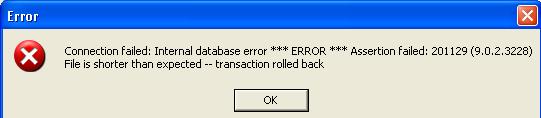
Internal database error *** ERROR*** Assertion failed :201129(9.0.2.3228) File is shorter than expected -- transaction rolled back
If you find the following error while configuring odbc connection for siebel tools.
Then most probably your .dbf file is corrupt. Its better to take a new database abstract file.
Reference: http://sqlanywhere-forum.sybase.com
Then most probably your .dbf file is corrupt. Its better to take a new database abstract file.
Reference: http://sqlanywhere-forum.sybase.com
Subscribe to:
Posts (Atom)